Advanced Interface Designs for the BLS Website: Final Report to the Bureau of Labor Statistics
Gary Marchionini, PhD
1. Introduction
This report summarizes work done from September 1, 1998 through July 31, 1998 pursuit to a contract that had two main objectives: a) designing and testing user interface designs for the BLS website that are rooted in user needs and tasks studies done in the previous phase of work, and b) extending the transaction log analyses done in a previous phase of this work and defining recommendations for BLS transactions logging procedures. In this document, this work will be referred to as the second phase (or current phase). As in the previous phase, Anita Komlodi and Stephan Greene were research assistants at the University of Maryland with Gary Marchionini and all worked closely with Carol Hert and her team at Indiana University and with BLS staff.
Other dissemination efforts related to this and previous work include papers submitted to journals and conferences (paper in review for Information Processing & Management, paper accepted for 1998 American Society for Information Science Annual Conference, papers in preparation for Journal of the American Society for Information Science), posting of the Final Report from the first phase to a website (
http://ils.unc.edu/~march/blsreport/mainbls.html), talks describing results and progress (ASIS 97 Annual meeting, Washington Statistical Society, FedWeb ‘97 Conference), and a briefing to the Federal Information Services Applications Council working group on Federal Statistics.1.1. Task description
The BLS website represents an increasingly important service that the Bureau provides to the public. The website will continue to evolve in the years ahead as technology advances, public information literacy grows, and as government continues to develop its online service capabilities and personnel. During the October 1996-June 1997 period, we investigated website structure and customer usage patterns for the BLS site (phase 1). That study led to better understanding of website users and their needs and to several recommendations for improving and extending development of the website (Hert & Marchionini, 1997). The second phase reported on here built on that work with an aim toward assisting BLS staff in building advanced interfaces and tools for new iterations of the website.
In the first phase report, many design recommendations were made. Some of those recommendations are relatively easy to implement (e.g., some hierarchical reorganization of the website, adding some query enhancement features, etc.), while others require considerable effort (e.g., providing an interface geared to users rather than agency data, developing procedures and tools for website management and maintenance). One mportant theoretical as well as practical problem raised by our investigation of users in phase one was how to develop the website to serve diverse user capabilities, experiences, systems, and needs.
In the second phase work, we focused on two specific interface design problems: alternative interfaces and transaction log tools and techniques. The former is a general problem in the HCI field and our work has both practical benefits for the BLS website interface as well as theoretical import for the design community. The latter leveraged our BLS transaction log analysis experience to specify procedures that will allow BLS to systematically monitor website evolution and may be transferable to other government installations.
Thus, the main objective of the work was to inform the evolution of the BLS website in general with special emphasis on defining alternative interfaces that serve diverse sets of users. A secondary emphasis was to develop a design concept for transaction log tools and techniques.
1.1.1. Alternative interfaces
One of the grand challenges of interface design is to effectively serve the complete range of diverse users and tasks without requiring that everyone learn a single interface style. This challenge is also manifested in the goal of government and business to provide universal access to all citizens and customers. One approach to this challenge is to create an interface that adapts to users as they work. In this approach, users may define general profiles and the system makes inferences about session-specific needs as work progresses. Many years of effort have gone into creating so-called intelligent interfaces and we remain optimistic that progress will continue over the long term (the task/question taxonomy developed in our earlier work may be applicable in this regard). A second approach, however, is more practical for the immediate years ahead. This approach pre-defines a small set of interfaces that users may choose according to their specific experience and needs. This approach is no less challenging conceptually, as the choices must be made carefully, the respective interfaces must be crafted to minimize complexity while maximizing system functionality, and the alternatives must be clearly represented so that the entire range of users can quickly understand and optimally choose the interface variant that meets their information-seeking situation. The work conducted in the second phase takes this second approach to the alternative interface challenge.
Many types of users visit the BLS website. The general types identified in our phase one study were: business users, academic users, the media, the general public, government users, K-12 education users, statisticians, and library/museum and other non-profit users. Likewise, users bring many types of tasks to the website. In phase one, we developed a multidimensional task/question taxonomy. The pragmatic (contextual) dimension includes attributes in three categories: goal (learn, verify, judge, explore, refer, subtask, ongoing, plan), constraints on the task (time, volume, geographic location), and system (database match to task, search and extract tools, formats, entry point and path). The semantic dimension includes attributes of topic, level of abstraction, level of specificity, and number of facets. The syntactic dimension includes attributes in three categories: expression type (what, where, who, how, and why), goal type (closed, interpretive, accretional), and specificity of expression.
The strategy taken in the current work was to use the taxonomy developed in phase one to define a small set of views that users may select to use during their sessions. These views were based on crossing user types—the roles people play (e.g., teacher, researcher)—and common tasks—the goals people have when they visit (e.g., gather information about moving, update a contract, etc.). These views were defined, prototyped as webpages, tested with BLS staff, and revised.
1.1.2. Transaction log tools and techniques
In our previous report, we found that transaction log analysis could be used to understand users' information-seeking strategies and as a tool for identifying interface features to improve. This phase followed up that work to help BLS develop the best ways to leverage transaction log data to continuously develop the website interface. There were three main goals: confirm trends and usage patterns identified in the first phase, to identify the primary functionality and goals for summary and sequential log analysis, and to suggest prioritized development actions.
2. User Interface Design
The bulk of our efforts went into addressing the interface objective. The guiding principles are first laid out, the procedures and testing results for each of the three prototype iterations are then presented, and recommendations for adoption and adaptation in the BLS site are made.
2.1 Problems and Principles
The BLS website provides citizens with extraordinary access to labor data. Both graphical and textual access is provided from a cleanly designed home page (
www.bls.gov) organized into nine main categories (additional categories—contact information, Department of Labor home page, and K-12 Educational Resources--have been added to make 12 choices in the current site). The nine categories are: data, economy at a glance, keyword search, surveys and programs, publications & research papers, regional information, BLS mission, management & jobs, other statistical sites, and what’s new. These categories reflect a BLS organizational view of services and one goal of the current work was to explore designs that are more user/task oriented. Finding the right mappings between user information needs and website data is a general design problem and we applied the empirically derived user-task taxonomy from the first phase to create design prototypes. This represents our application of the user-centered design principle.A second general problem for sites such as BLS that aim to serve all citizens is to provide an interface that meets the needs of diverse sets of users with different abilities, experiences, systems, and information needs. There is extensive work in the user modeling literature (e.g., there is an ongoing conference series
http://www.um.org/conferences.html on user modeling) that aims to discover and/or elicit user prototypes and then have systems automatically adapt to these prototypes. A general design principle we espouse is to always give the user control (including the potential to assign control to systems temporarily). This principle leads us to design alternative interfaces rather than adaptive interfaces. Alternatives include simple preference settings common in many application packages, a literal menu of alternative interfaces (for example, the NASA global change master directory website offers users a choice of two experimental interfaces for exploring the directory, http://gcmd.nasa.gov/), an implicit set of options arrayed on a graphical layout, an implicit set of options activated in cascading fashion as users make selections, and hybrid approaches that combine some user profile with selections. The approach taken in this work was the implicit set of options arrayed on a graphical layout since this seems most consistent with a third principle (discussed below) of minimizing mouse clicks and bringing users to primary data quickly. This represents our definition and adoption of the alternative interface design principle.A third general problem all websites face is giving users easy access to the information they need. There are two primary solutions: eliciting a query from the user and applying a search engine to return a ranked list of potentially relevant pages/objects, and providing a series of choices for users to "drill down" through until they find the most appropriate page/object. The former is a form of analytical search and the latter one form of browsing (Marchionini, 1995). In this project we focused on the browsing solution. BLS provides a typical keyword search facility and we included both quick (simple) and advanced search options in the interface prototype but did not specify complete mechanisms for either (this should be done in some future project; see Shneiderman, Byrd, & Croft, 1998 for general guidelines on what features should be included in search interfaces). Problems related to browsing include user disorientation (getting lost in a set of selections), distraction (becoming seduced by interesting but immediately irrelevant selections), and frustration due to too many ancillary actions before getting relevant information (this often leads to abandonment as well as dissatisfaction). Our approach to the problems of disorientation and frustration (we pose no solution for helping users maintain the self-discipline to remain on task) is to try to minimize mouse clicks and bring primary information as close to the user entry point (home page) as possible. It has become common to hear designers talk about a "three click rule" that aims to get users what they want in three clicks or less. We have applied techniques to collapse hierarchy and use information abundant widgets (Marchionini, Plaisant, & Komlodi, in press; Shneiderman, 1998) to this set of user problems. This represents our application of the information abundant design principle.
Finally, website designers must find ways to represent complex information and organization in sensible displays. We have chosen a visual metaphor rather than a textual list, array, or hierarchy. The visual methaphor is a set of paths with gateways to different types of services. This design uses the mutually reinforcing techniques of positional clustering and a physical navigation metaphor. This represents our application of the spatial display design principle.
2.2 Procedures and Results
The interface had three iterations, each of which yielded a prototype that was presented to BLS groups and revised based on their reactions. Because the prototypes and testing are integral to the each succeeding iteration, testing results for each iteration are given immediately after each iteration’s design description. The overall approach was to use discount usability testing (Nielsen, 1993) in the first iterations and laboratory usability testing in the final iteration. Suggestions for further development based on the user testing of the third iteration are included in the Summary and Recommendations section.
2.2.1. Iteration 1.
Design
Based on the user taxonomy and guided by the design principles above, a paper-based design was created and presented for discussion at a meeting with BLS staff on January 6, 1998 (Conrad, Bosley, Dippo, Tucker, Klein, Hert, Marchionini). This meeting served to provide first-level reactions to the design and raise suggestions for improvement. A second set of reactions were obtained in a meeting with Labstat staff on January 24, 1998.
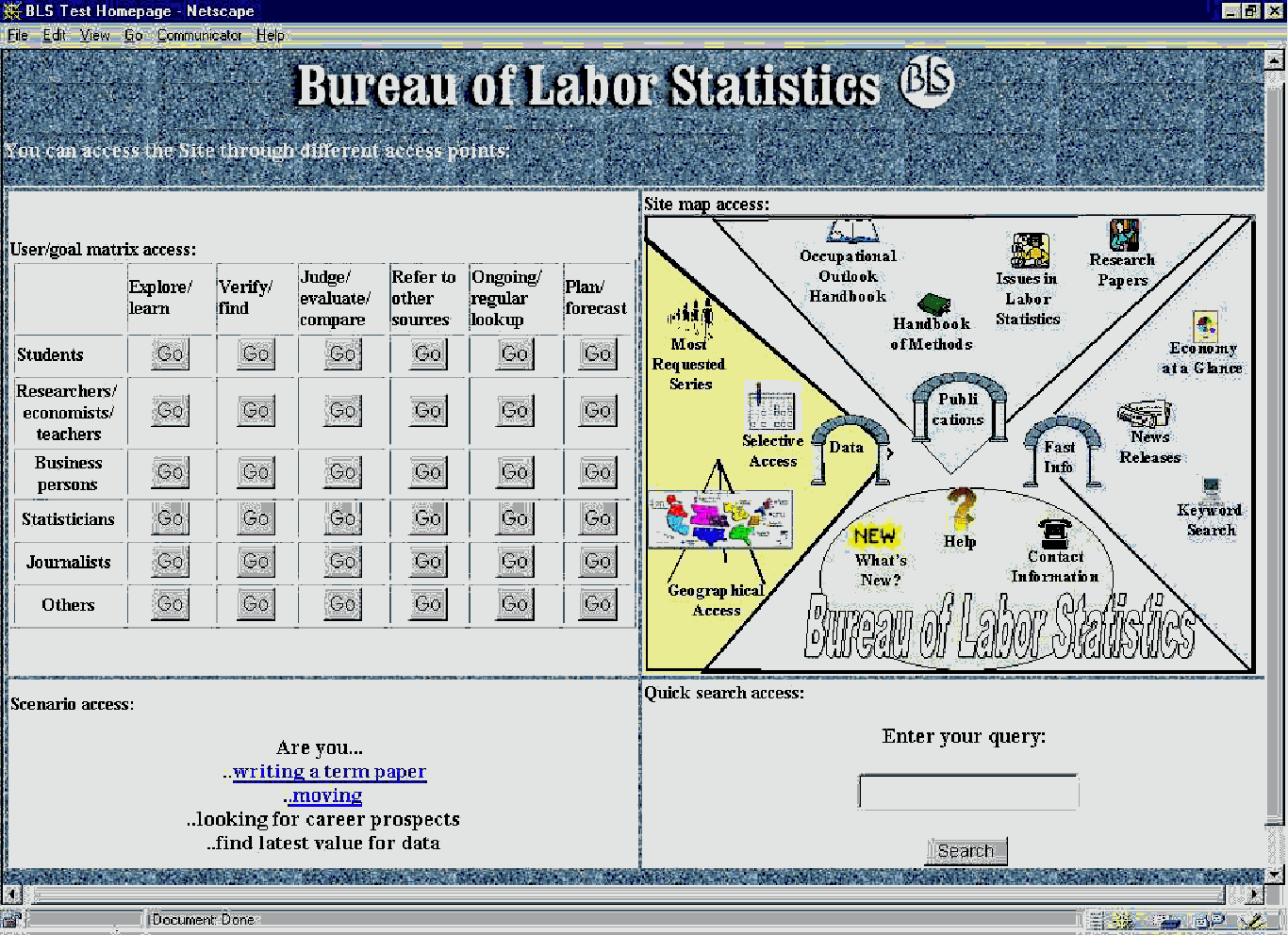
This original design provided four different access modes to the website (see Figure 1). These four access methods provide access alternatives for users on a single screen rather than having users first pick an interface from a short list. These alternatives present very coarse distinctions between access methods because the system's user model is based on the general user type/task rather than a personalized user profile. Although the type/task taxonomy could be used as the basis for a template that users could complete to create personalized user profiles, the elicitation and completion process are tedious and may be difficult for novices. Additionally, hundreds of thousands of profiles must be stored and managed. A more generalized ‘just-in-time’ solution was, therefore deemed more practical. The pre-determined ‘profiles’ used in our design aimed to provide a range of access methods as well as specific instances of user type and task. To better communicate ‘type’ and ‘task’ to end users, the terms ‘role’ and ‘goal’ respectively were used in the design.
We included two approaches to the design challenge of presenting role and goal alternatives to users. The first was based on the notion that users can map their need onto the entire taxonomy as an interactive form. This allows the possibility for users to fill out the whole taxonomy and store it on the local machine as a profile (assuming some Java applet would transfer this to the server upon connection). For this prototype, we focused on developing and testing the viability of the full taxonomy approach. The second approach simplified the process of expressing user needs by providing a small set of scenarios that were based on the most frequently used cases of the taxonomy (based on our research in the first phase). This approach can save considerable user time and system resources as the most frequently needed scenarios would serve a large percentage of users at the expense of providing coverage for the full range of types and tasks.
The matrix in the upper left part of the screen represents our first attempt at implementing the full taxonomy approach. Some of the user and task categories defined in the previous phase work were collapsed for a less complex design. The two matrix dimensions (role and goal) were each divided into six categories (role categories were students, researchers.economists/teachers, business persons, statisticians, journalists, others; goal categories were explore/learn, verify/find, judge/evaluate/compare, refer to other sources, ongoing/regular lookup, and plan/forecast), yielding 36 cells representing role/goal categories. After creating the matrix, the most useful information sources and search tools for each cell in the matrix were collected. The plan was to present a set of optimal pages for each cell of the matrix. The display provides pages in a left index frame and specific content in a right frame. A key issue is whether users can successfully identify their role and goal. If so, the system can better customize search tools and interfaces to serve their needs, i.e., the system would have a better model of the user than if the user simply chose from a few alternative access modes.
The upper right corner of the first iteration screen design provides a graphical site map. Site maps provide spatial views of the organization of the website, thus providing easier navigation and better understanding of the structure and functions of the website. Most site maps are simple textual tables of contents for the site. Although these are useful, problems with scrolling, manipulating hierarchy, and showing relationships other than parent-child are well known. Additionally, graphical maps may help to overcome some of the ambiguity of linguistic expression. The site map in this iteration was organized by functional units: data, fast information and publications. The fourth region contains other items such as help, contact information, etc. This three-way organization reflects our understanding that the main focus of the BLS website is to provide statistical data, summary information compiled from this data, and publications building on the data and the information. This map provides access on two levels. It enables frequent users to go directly to the page of interest and it helps novices familiarize themselves with the site.
The lower left section of the screen presented links to scenarios. These are tasks that our previous work indicated are frequently brought to the BLS site. For each scenario, a set of useful pages was compiled to make information seeking and navigation simpler and more effective. Scenarios are well-defined cases of the user type/task matrix, but the user does not have to fill out the matrix to define his/her situation. For a large number of users, such context-based scenarios may quickly and easily match their information needs.
Keyword search is an essential service for any website (transaction log analysis shows that large portions of the requests are to keyword searches from the home page or within different BLS services). At present, BLS provides a single search service. Many web portals (e.g., Excite, Lycos) have expanded to provide simple and advanced options as well as specialized features such as relevance feedback, alternative term suggestions, etc. For the prototype, we included a quick search option. This seems reasonable since users may not be willing to spend more than few minutes at a site (as we can see from the high portion of abandoned sessions in the transaction log analysis). WWW users are also used to having a quick search box available on most sites today.
Results
Several problems with the matrix were discussed. First, it presents a complex framework that may be overwhelming for novice users. Second, users may not be able to accurately classify themselves according to these categories since interpretation of the labels can vary from user to user and also can be very different from the page mappings built into the system. Third, these interfaces can slow down access for expert users by shielding them from direct access to sources and tools. Fourth, the set of pages relevant to each cell showed considerable overlap. The challenge of mapping cells to best sets of pages caused considerable discussion and the 36 variants were judged to not provide sufficient differences to warrant the screen real estate given to the matrix.
The BLS staff surmised that uses would easily understand the scenarios and would find them useful, although everyone recognized the need to fully develop and test the suite of scenarios with broad constituencies over time. Reactions to the site map were highly favorable and we were encouraged to enhance the site map metaphor in subsequent iterations. The general approach was discussed with respect to Labstat’s homepage content draft (dated September 5, 1997) and most of the basic functionality and user-centered perspective were found to be in agreement. Challenges related to geographic and cross-survey access, and providing vocabulary and other help to users were discussed. Based on these sets of discussions, a second iteration was initiated.
2.2.2. Iteration 2.
The second iteration focused on the site map, incorporating the comments from the first meeting with a BLS group. All four access methods remained in design but the site map became the focal point. The user task/goal matrix was changed to provide two drop-down menus (one for each of the role and goal dimensions). This saved considerable screen real estate and allowed a more detailed site map to become the centerpiece of the design. New scenarios were also added to the design. This design was mocked up in HTML with JavaScript extensions so that it could be shown online rather than on paper. This not only allows a more realistic look and feel but also allows some of the interface dynamics (e.g., screen transitions) to be demonstrated. This prototype was discussed at a meeting with BLS staff on March 24, 1997 (Conrad, Bosley, Tucker, Klein, Hert, Marchionini) in preparation for a feedback meeting with five BLS staff members not familiar with the project. That meeting took place on March 30, 1997.
A screen dump of this prototype is presented in Figure 2. The upper part of the screen contained and extended the search function with a three-line search box and search buttons customized to the different sections (topical areas) of the site (suggesting more focused, field-delimited searching). This was meant to inform users about the different types of content available at the site and also help them better focus their searches to yield fewer irrelevant materials.
Design
The site map was greatly expanded in this iteration. The site map was made larger in size and resolution and had a more prominent place on the homepage. The spatial arrangement of four functional areas and the color coding to emphasize those regions remained in the design. To push the information-abundant design principle, many new links were added to the map representing two or three levels of the web site hierarchy. On the left side, in the data region, direct links to the search tools by content area were added. This multiple-layer access was designed to help users understand what they will see under a link before actually going there, thus enabling better navigational decisions. At the same time it provides direct access to pages two or three levels down the hierarchy of the website, thus saving time for users who know what pages and tools they want to access. The spatial metaphor of the design suggests three regions with gates leading to them and a foyer area in the forefront of the design where general tools can be found. This graphical layout was a mockup and needs more careful graphics design to better reflect the spatial metaphor.
In the Economy at a Glance section the design provided actual data extracted from the larger economy at a glance table. This brings primary data immediately to the fore, a principle we have implemented in our Library of Congress designs (Plaisant, Marchionini, Komlodi, & Bruns, 1996). The data here can be selected on the basis of most frequent use and can be updated depending on changing demands. Displaying data on the homepage would save users effort and time in navigating. Of course, this complicates the overall page layout considerably. Presenting the second level links on the site map also aimed at putting the user much closer to the data directly from the homepage. This design allows user to get to the actual content of the site in one or two clicks rather than three to five.
Wording of the labels on the map was given careful consideration. In some cases wording from the current BLS website was kept, (e.g. Handbook of Methods, Economy at a Glance, etc). In other cases new, more user-oriented wording was chosen (e.g., Quick Access, Advanced Access). Although this helps novice users to better understand what they will find behind a link, it may make it more difficult for experts and frequent users to find certain familiar tools or pages. An example compromise was the label ‘Series Report: Expert Access’ where BLS wording was supplemented with explanatory words. However, these labels can get very long and take up too much space on the map. To solve this problem, pop-up windows with short explanations were included in the map. These explanatory messages were implemented as mouse-over features that cause the messages to appear as the user moves his/her cursor over a part of the map. The goal of these messages is to help the user learn what is behind a link before actually going there. This can save user time and effort by avoiding unnecessary navigation and also better inform the user about the options of the site.
The matrix was still present on this design in a less screen-consuming form; it was presented as two drop-down lists from which users can select their own role and goal for the current visit. The actual pages behind these links have not been updated since the first iteration of the design. Selection of these pages could be greatly enhanced by the expertise of intermediaries working with users.
Results
The prototype was demonstrated to the LabStat and Publications group and participants were invited to ask questions or make comments at any time. The group was supportive of the aim to minimize user mouse clicks and the techniques of providing alternative interfaces. The topic that generated the most discussion at the meetings was the linkage between roles and goals. One suggestion was to separate roles and goals to simplify the choices for users and the mappings to BLS services. Roles suggested as important included real estate agents and economists. Goals suggested as important included contract escalation (e.g, updating contracts to account for inflation), moving, wages, and prices (cpi and ppi seperately). The general consensus was that the matrix and the role/goal specification would be confusing for people to use as well as difficult for BLS staff or expert users to agree on the best mappings for each role/goal combination.
The overall development cycle for the BLS website was also discussed. It was agreed that the website is an evolving entity that will require regular updates in design as well as content. Although it was suggested that a 3-month development cycle should be achieved, it is unlikely that the Bureau will be to support or tolerate such change rates. Discussions with other Department of Labor agencies on common guidelines must also be taken into account when planning upgrades.able
2.2.3. Iteration 3.
Design
The online prototype was revised based on the feedback from BLS staff at the two meetings. The third iteration was then tested with six BLS staff members from a variety of divisions and job roles. The testing was conducted in the BLS Usability Laboratory. Separate one-hour sessions were held for each subject (April 17, 1998 and May 4, 1998). A testing protocol was developed (see Appendix A) to guide the sessions. The protocol included three sections: an introduction in which subjects were introduced to the prototype and purpose of the testing and background information on their work experience and website experience was elicited; a set of eight scenarios that subjects were asked to use to guide searches with the prototype, and one self-directed task; and a debriefing section that elicited user responses to both specific and general questions about the interface. Subjects were seated at a workstation with the prototype with the investigator (Marchionini) seated next to them. Subjects used the mouse and keyboard to execute the scenarios while the investigator prompted them and took notes. Two video cameras and a microphone were used to record activity. One was trained on the subject’s face and one (ceiling mounted) was trained on the keyboard. These signals as well as a video out from the workstation display were fed into a video mixer and a three frame video composite sent to a VCR. The resulting tape showed the screen, keyboard and mouse, and user’s face. One disadvantage of this setup was the inability to see what subjects were pointing to on the screen as they discussed their actions and responded to investigator queries. A second investigator (Komlodi) controlled equipment and took notes in an adjoining room where the recording equipment was housed.
The final prototype (see Figure 3) eliminated the role/goal feature completely. The three search boxes were collapsed to a larger one with separate search buttons by content area remaining on the right. The collapsed search box suggests to users to enter longer expressions when searching. The site map remained the focus of the homepage and the scenarios were integrated onto the map and completely took over the role of the user task/role matrix (see Figures 4 and 5 for scenario pages).
To save space, the Current statistics data table was redesigned to reflect only the most used statistics (a change that was based on the March 30 meeting feedback). Some of the icons were changed and a Hot Topic area was introduced on the map. Based on the discussions in previous iterations, the user/task matrix and the scenarios were united in this design, since the scenarios are general instances of user role/task combinations and they provide coarser models of the user to the system. Based on consultation with the BLS teams, five scenarios were included: moving, writing a term paper, verifying data, exploring career prospects, and teacher. The first four represent tasks (goals) and the fifth a user type (role).
Results
The user testing yielded a rich set of data (approximately six hours of video tape and dozens of pages of notes made by the two investigators). The subjects were all BLS employees and in the background discussion we learned that four subjects were daily users of the BLS site, used it as their default home page, and mainly used it to help users who call or email. One subject used the site occasionally and one seldom used it. This relatively high level of familiarity must be taken into account when interpreting results and applying recommendations to the general population.
First Impressions
The protocol was designed to elicit an overall first impression of the design before subjects actually used it. This approach has the advantage of drawing out naïve first reactions unbiased (and uninformed) by the assigned tasks, and the disadvantage of setting up first impressions that may be inaccurate but reinforced as users work (people tend to try and reinforce impressions as they work rather than correct them, [Tversky & Kahneman, 1974]). We felt that gaining the first impressions would be highly useful and asked subjects to react to the overall layout, whether it would be helpful for searching, and how they thought they might use it in practice. Paraphrased statements made included:
S1:
Map needs better graphical metaphor
Search full site should come first
S2:
Terms used too close to BLS, should be more user-friendly
S3:
Data should be most important on map
Too complex—better for expert user
Use drop-down menu instead of search buttons to save space
Design does not reflect real content well
S4:
Word ‘search’ is repeated too many times
Problems with label wording
Map too cluttered but likes graphical organization
Reduce number of links for people with slow browsers
There can be other geographical access than regions
S5:
Scenarios are good because people call in with specific problems
At first sight it’s a lot but when you look at it more it’s helpful
S6:
Does not like search on web in general, would rather just browse and click
Does not get the spatial metaphor, needs better graphical design
Likes that it is on one screen and no scrolling necessary
These initial reactions illustrate both the sophistication of the subject sample and the complexity of the design approach. Many of these themes (cluttered look and feel, terminology, potential for scenarios, and potential for a content-oriented spatial organization) reoccurred as subjects completed the tasks and in the debriefing discussion.
Assigned Tasks (protocol scenarios)
For the eight tasks, subjects made a total of 72 actions with the interface. In most cases, these actions ended with a page retrieval that satisfied the scenario at some level of effectiveness. Because solutions are sometimes interpretations and there are often multiple relevant pages, no attempt was made to determine an accuracy score. Our general sense was that subjects were successful in the vast majority of trials. For the eight tasks, the total number of actions taken by all six subjects in aggregate were 12, 6, 10, 7, 10, 7, 7, and 13 respectively. In five cases, there was no action taken or an action was suggested based on experience with the current BLS site (e.g., selective access, look for announcements or warnings). It is interesting to examine the very first action users took for each task. There were 43 ‘first moves’ (six subjects for eight tasks less the five special cases of no or unusable response). Table 2.1. summarizes the number of selections made for different services. Note that only geographic access, search, and data are currently on the BLS home page, thus subjects would have to make at least two mouse clicks on different screens to get to their first choice to begin answering these questions. Thus, 34 of the 43 first choices (79%) would have required at least one additional mouse click on the current homepage. Moreover, geographic access on the prototype allowed subjects to immediately select a region without going to a second screen and making another mouse click. A design that saves 80% of the clicks from a page that gets 100,000 or more hits per month yields significant savings on both the client and server side. On the client side, assume a 2 second wait for a page to load (a faster connection than home modems offer), 160,000 seconds (more than 44 hours) of collective user wait time would be saved each month. On the server side, 80,000 fewer requests per month would need to be served. For pages that save many mouse clicks the user and server savings can be substantial. One caveat on the user side is that fewer clicks may come at the expense of more thinking time. This would be an interesting hypothesis to test in an environment with virtually no response wait time. The server side savings for information-abundant designs hold in any case. Thus, user performance lends strong support to the effectiveness of the information abundant design.
Table 2.1. Subject first choices for eight assigned tasks
Service Frequency
News releases 11
Geographic access 6
Quick access 6
Scenarios 6
Handbook of Methods 5
Advanced access 3
Economy at a glance 2
Search 2
Research papers 1
Data 1
Total 43
Debriefing Discusion
The debriefing section was meant to prompt subjects into giving frank feedback on the interface after they had some experience using it. Table 2.2. provides paraphrased statements summarizing the responses to the debriefing questions used in the protocol. Note the paraphrase lists are generally in order by subject but specific assignments of statement to subject are not included.
Table 2.2. Paraphrased statements in debriefing.
1. Understand difference between data and fast info?
data is time series; fast info is news releases, current issues, freshest material
data is not clear
fast info doesn’t make sense to me
not really
3. Does overall organization seem clear?
too much on one page, lines confusing
sectorization good, seeing lower level helps in interpreting higher levels
not very good but maybe because (s)he knows BLS too well, may be too cluttered for some users
color coding helps
3. Does 3-way division of content make sense? Alternatives?
use the building metaphor all over (throughout design)
divisions between different levels of the hierarchy not clear
too much emphasis on main gates
likes color coding but lines confusing
4. Is the screen too cluttered or confusing?
yes, lots of information but well organized and legible, some terms are too BLS-y
better indication of boundaries needed between sections
yes, graphical design not obvious
it is, because it gives many options, but on second look it does not take long to decide where to start
yes, at first it is, but after looking at it for a few minutes like that everything is on one screen and does not have to scroll
5. How would you comapre this to the existing site?
more artistic, more subject-oriented rather than BLS
scenarios helpful
this is quite helpful, more visual than intranet, takes less time to decide where to go
take a lot more time thinking where to go
should have BLS logo bigger
more complicated, can’t figure out the graphical metaphor
liked having everything on a screen don’t like to scroll and go back
6. Do you think this interface will be better? Why?
sectorizing very useful, especially in quickly orienting people to right neighborhood and tell them what’s there
likes geographic access and current stats table on homepage, homepage invites you back as it may be updated later
yes, tells end uses about the structure of the site, tells you where the different information is
7. Do you think this interface will be faster to use? Why?
there is a learning curve, first time users may be frustrated
being able to sort things out at first step
faster to find entry point, visual roadmaps helps, save time compared to reading
can get to a desired starting point more quickly
takes longer to understand but shorter to navigate
graphical design confusing
8.Do you think this interface will be worse? Why?
not really, might not notice the organization
need to explain levels of hierarchy to users
some labels are vague, have to tell people what’s underneath
lists would be better as pop-ups
not sure, didn’t get the arches and road at first
Will the interface serve a variety of users? Why? How?
it is more content and subject oriented
yes, even high school kids and middle school kids
What is the best thing about this prototype?
Three way layout of info
Users can easily and quickly pick out best general area to start with
Roll-over help good
Conveys flexibility, not rigid, more interesting
Up front info
Access to different data types available right from homepage
Has Occupational Outlook Handbook in front
nice to look at, more topic oriented
Visual
Its, all there
scenarios good
What is the worst thing?
Lots of data, lists are organization (BLS) driven
Glossary between BLS and user terminology needed
Too much space wasted on things people don’t look for
Looks busy, no distinction between places, assumes user knows the site
Crowded
Kind of overwhelming at first glance
Too much visually
Lines a little confusing, takes a while to figure out, icons don’t work well
Suggestions
quick access is too vague
most of the action is outside the center
get rid of the lines
add glossary, give the high level info plus explanations & glossary before the fine grained details
put news releases on the boundary of data and publications
clarify fast info and quick access
add state & area data
add search by subject, search by BLS people
advanced search too much, consolidate
BLS screen currently geared to professionals
Terminology
About half of the subjects understood the distinction between ‘data’ and ‘fast information,’ others expressed concern about the clarity of the distinction, and some suggested more extensive explanation about the labels and terminology used in the design. One subject strongly preferred ‘quick’ to ‘fast’ information. Another argued for a glossary to map user vocabulary to BLS vocabulary. Clearly, for all labels we need to find a common term to use as the default and then provide mouse-over alternatives and explanations.
Organization/layout
We gave considerable attention to the overall organization of the design. The best aspects of the design mentioned in the debriefing were the visual display, ease of navigation (once the organization/layout was understood), and availability of many links from the homepage without scrolling. The visual display and cluttered layout were also mentioned as the worst aspects of the design. This seeming contradictory reaction to the design’s organization and layout illustrates the tradeoffs between managing complex and extensive information and the desire to have intuitive interfaces with no learning curve. Perhaps a better way to think about the realities of the goal is to aim for steep learning curves for websites, i.e., we believe the principles used in this design require a very brief but highly focused and cognitively demanding learning period that will lead to much better performance due to users gaining an understanding of the availability and overall structure of the site and facilities for getting to primary data faster and more precisely.
The overall organization and the three-way distinction was clear to four of the six subjects. One subject felt that it reflected the BLS organization too much and another was unclear about the different levels of the hierarchy and why different levels of access were necessary. The spatial metaphor seems useful for them but the graphical design needs more work to present a cleaner picture that is easier to process. Compared to the existing site, some subjects questioned the clarity of the visual design, but most subjects found the new design more visual and generally organized more around subjects and topics instead of the internal organization of BLS. One subject referred to the current BLS design as the ‘block’ design—an apt description of its highly structured and neat organization. One subject thought the prototype design showed the structure of the site and where different information is located. One noted the possibility of placing the user in the right neighborhood and another found it conducive to finding a good entry point. More choices on one screen slows users down since it takes longer to understand the first screen. One subject felt there would be a detrimentally long learning curve and another thought it would take longer to understand but eventually make for easier navigation. On the other hand, one subject said " I think it would be faster in that you can at least get to a desired starting point even if you don’t get your information." The issue of quickly finding an entry point and easier navigation are important to consider in future iterations of the BLS website.
All subjects felt that the screen was cluttered. On the other hand, half of them mentioned that after looking at it for a few minutes they understood the organization and distinctions and appreciated that they did not have to scroll and everything was presented on one screen. A quote from one subject responding to the overall organization question in the debriefing illustrates this tradeoff. "Now that I’m looking at it, I’m seeing there is a correlation between these three things here, all the data stuff is in this area, under this arch, and the fast information in there, but at first glance I didn’t think of it as that. Then all the publications, now that I look at it are up there." This clearly shows the tradeoffs of the information abundant design principle, whether it is worth a short learning curve to provide a more navigable and informative website is the key design question.
Scenarios
Subjects liked the scenarios. One noted how useful they would be to users who might otherwise call for support. This subject noted: "This is good because I have a lot of people calling our office looking for information. They’ve been to the website but they couldn’t actually narrow down what they actually wanted. They want to talk to a person, they want to explain that I’m writing a paper or I’m moving, I’m trying to verify data, whatever---to talk to somebody to tell them that---they’re hoping that somebody can direct them to the right place without having to search all over the place. So immediately I thought, boy this is great for an outsider." Expanding and testing good scenarios for the BLS site should be a high priority for site planning and development.
2.3 Recommendations
BLS has an upgrade path defined (Labstat staff have upgraded the server infrastructure and have plans to revise the website interface in coordination with Department of Labor guidelines) but full site redesigns are both expensive and require policy actions. We recommend that Labstat continue its practice of making incremental changes while planning for periodic major revisions. Because major revisions cause significant disruptions in user work flow and the already large installed base of BLS users continues to grow dramatically, an inertia effect that will make it likely that major revisions will be infrequent. Much of the operational effort in website development will then go into occasional small changes and additions. Rather than being solely driven by technical developments, these incremental improvements should be guided by a customer-oriented continuous-quality-improvement perspective that relies on user feedback using techniques such as email content analysis, transaction log analysis, and periodic usability testing. This process may tune existing features, incorporate selected new features on an ad hoc basis, and then fully incorporate new features and revise existing features in a scheduled complete re-design. What follows is a set of recommendations for changes at both the incremental and major-revision levels. The first set (labeled A1-A4) includes incremental changes that can be easily made to the existing homepage and the second set (labeled B1-B4) includes more substantial changes more appropriate to a major redesign event.
A1. Add scenario option. Fully implementing the visual metaphor with the information abundant widgets may be too ambitious but it should be rather easy to add a scenario option to the existing design. We suggest that BLS take the scenarios developed in this project, distribute them to BLS staff for comment and suggestions for additions. It is important that as staff make suggestions for additional scenarios that they also provide a list of the best web pages that satisfy the scenario.
A2. Cluster graphic icons on home page. The current array of icons is unordered. It costs nothing in screen real estate or debugging/testing time to more consciously cluster the existing options on the home page. We suggest the clusters used in the prototype: data, summarized data (was termed fast info on the prototype, which should be renamed), and publications. One possible clustering would group data, regional information, and surveys and programs (as a middle column), economy at a glance, publications, and keyword search (the left-most column), and BLS Mission, Other statistical sites, and what’s new as a third column. This is an easily implementable incremental change.
A3. Restructure selected pages. The transaction logs in both phases of work illustrate that the Occupational Outlook Handbook and News Releases draw far more interest than most of the top-level choices on the home page. On the other hand, BLS Mission and Other Statistical Sites get relatively little attention. It may be prudent to move OOH and NR up to the home page and move BLSM and OSS down a level.
A4. Collapse hierarchy on the textual links on home page. Another change that would be easy to implement and may improve access at the cost of a bit more screen complexity is to add subchoices for each category in the text-only portion of the screen. This would not take much more screen real estate but save frequent users one click and guide new users with strong cues about where links will lead. One layout option is as follows:
Data: Most Requested Series, Selective Access, News Releases, Series Report, FTP
Regional Information: Boston, New York, Philadelphia, Atlanta, Chicago, Dallas, Kansas City, San Francisco
Surveys and Programs: Employment/Unemployment, Prices, Compensation, Productivity, Emp Projections, International, Other
Economy at a Glance
Keyword Search
Publications: Occupational Outlook, News Releases, MLRO, Research Papers, Issues, CWC
BLS Mission: Statement, Sr. Mgmt, Fellowships, Jobs, Intn’ Training, Strategic Plan
Other Statistical Sites: FedStats, National, International
Contacts
What’s New
Note: the main category could be displayed in a larger font than the subcategories, which could also be indented.
Note: EAG could be eliminated as a Data subcategory since it is a major category on the home page. Likewise, contacts could be eliminated from Publications as it is a major category. A full review of the labels should also be made to find more task-oriented terms.
B1. Create and disseminate development plans. Develop and publicize tactical and strategic plans for incremental and major revision levels of development. Encourage BLS staff and end users to make suggestions and comments. One caution is to not over-react to small but vocal groups--be user oriented, but not user driven. Include systematic data collection and triangulation to inform changes (e.g., transaction log data, user feedback, email content analyses, usability testing). Such planning reflects the organizational discipline present in other key parts of the corporate culture at BLS where regular surveys, reports, and releases are expected and depended upon.
B2. Implement a graphical design with primary data on the homepage. Consider a new graphical design that clusters data, summarized data, and publications, and brings key primary data to the home page. The design tested here is a good starting point for such a design. It makes sense to provide such a design as an alternative (with a separate URL) and invite selected users to try it out and provide feedback while the existing site continues to handle the mainstream activity.
B3. Improve search. Add simple and advanced search options that allow field/sector delimited options. Offer alternative terminology or ask for clarifications, and spell check entries. Provide opportunities for relevance feedback (more like these). Provide richer results displays with user-controllable options for filtering and sorting.
B4. Improve vocabulary. Conduct a complete study of site vocabulary with the aim to integrate general vocabularies with statistics-specific vocabulary. Work to develop a statistical thesaurus that all government agencies can use. Explore interface mechanisms for displaying alternative vocabulary.
B5. Add user help and education. Develop usage-sensitive, on-demand help for services that transaction logs and user feedback show are most troublesome for users. Provide glossaries, tips, and suggestions for users that help them better find and use statistical data.
B6. Work toward interoperation with other agencies. As more novice users visit the site, many of their needs will be met by statistical data at other agencies. To provide a more fluid, user-oriented environment, develop links to other agency data at the leaf level of BLS pages, develop vocabulary and table mapping services between different agencies (in lieu of cross-agency standards).
B7. Consider other new services.
B7.1 Frequently asked question (FAQ) services can be helpful to both new and experienced users. The current contact information is laudable but providing services such as FAQs that help people help themselves before contacting BLS staff seems a win-win action.
B7.2. A related service is online reference, which is difficult to provide but some examples of primitive services have emerged in other government agencies (e.g., Energy Information Administration’s Energy Data Query System leads users through a series of selection menus to define a desired data set [http://www.fedstats.gov/index20.html] and the National Agricultural Library’s AgNic services provides a reference template users complete that is then automatically processed with the possibility of professional librarian assistance [http://www.agnic.org/orsp/].)
Transaction Log Analysis
In the first phase of this work, a process for analyzing summary data and sequential data for transaction logs was developed and applied for selected months of 1996 (see Seeking Statistical Information in Federal Websites: Users, Tasks, Strategies, and Design Recommendations Final Report to the Bureau of Labor Statistics, Hert & Marchionini for details). The intention of this second phase of work was to replicate and extend the analyses to 1997 data to verify usage trends. Because web technology is developing rapidly, several changes influenced the work. First, the BLS website itself evolved (new features such as K-12 Educational Resources were added and some web pages were combined or moved). This affected a few of the sequential analysis codes as well as some summary data page counts, and the server migrated to Microsoft NT, which affected performance (adversely during the transition and positively once the transition was complete and new procedures established). Second, BLS adopted a commercial statistical tool for its website (Microsoft Usage Analyst), which provides many of the summary data recommended in the first phase but uses different bases for counting hits and requests (e.g., by calendar month rather than by weekly period as the custom BLS summaries did; slightly different domain categories than used in our previous work). See Cooper (1998) for a recent overview of considerations for instrumenting web-based retrieval systems.
3.1 Procedure
As in the previous phase, summary files were obtained from Labstat in order to compare overall web page usage over several intervals. In this phase, summary files for September and November 1997 were obtained. In a discussion with Labstat staff (January 23, 1998) it was noted that the conversion to the NT server may have influenced summary data since the server was down periodically during the September/October transition period. These files were examined manually and page counts (hits) for the top-level services and for the frequently-accessed services were added to the spreadsheet created in the first phase. Two new columns (September and November) were created for raw counts and four new columns were created for percentage changes (March to September denoted as B to C; September to November denoted as C to D; March to November denoted as B to D; and December 96 to November 97 denoted as A to D). Each of these intervals represents 31 days of activity (the March files were 32 days and were adjusted by a 31/32 factor).
A Comprehensive site analysis report for the month of February 1998 produced by Microsoft Usage Analyst was also obtained. These reports ar now made available through the BLS Intranet to BLS staff, an excellent development. This report provides much of the same type of data that the custom BLS summary reports produced, but differs enough to make direct comparisons in chart form difficult. General comparisons and observations are included in the results section.
Additionally, the complete http server log for October 1997 was ftped and the custom C programs developed for phase one were applied to parse the logs into sessions. These sessions were then examined using the Sequence program and selected comparisons were made based upon the sequential data. See the phase one final report for details on how logs were parsed, the coding scheme used, and what analytic procedures were applied.
As part of related work under Carol Hert’s direction, an empirical caching study was conducted by John Fieber (
http://fallout.campusview.indiana.edu/~jfieber/papers/bcwla) to determine how caching affects transaction logs. One obvious effect that was strongly confirmed by this study is that web pages at top levels of the page hierarchy (e.g., pages linked off the home page) are undercounted in transaction logs since most users begin there and most subsequent returns during a session use the cached page rather than re-requesting the page from the server. In the BLS case, the BLS home page was displayed 80 times but only logged 5 times for a cache rate of 94% and other top-level pages showed rates in the 60-80% range (cache rate was computed as 100-(L/D), where L is the logged frequency and D is the displayed frequency).3.2. Results
Results are divided into two groups: summary and sequential analyses. The analyses replicated most of the analyses done in the first phase work and comparisons across the various time periods were made whenever feasible.
3.2.1. Summary trends December 1966 to November 1997 (Dec 96, March 97, Sept 97, Nov 97).
The rapid growth in BLS website usage continued in the final quarter of 1997. Table 3.1 summarizes the page activity for the top-level services (pages) on the BLS home page. The data demonstrate that overall usage on these top-level sites roughly doubled over the 11 month period. For the purposes of rate of change comparisons within each page category, caching rates are unlikely to influence results (since the rates would presumably be stable for the same page over time). It is interesting to note that the highest rates of usage are for publications (deeper analysis indicates Occupational Outlook Handbook and News Releases show greatest usage as well as increases) and keyword searches, services that may be used by more general audiences; while there is a decrease or small growth in ancillary information such as BLS mission and other statistical sites (strongly suggesting that these options be moved down in the organizational hierarchy). The core data services (BLS data) show good growth but considerably less than the digested information in publications. One obvious explanation is that there are many more causal users coming to the site than sophisticated users (of course this has to be so since there is a much smaller number of statisticians, economists, researchers, journalists, accountants, and other specialists to attract as new users than the general citizen pool).
Table 3.1. BLS Top-level Service Activities December 1996 to November 1997.
| A | B | C | D | A-->B | B-->C | C-->D | B-->D | A--D | ||||
| Page | Dec-96 |
Adj March | Sep-97 |
Nov-97 |
%chg A | %chg B | %chg C | %chg D | %chg E | Service | ||
| blshome | 67025 |
101245 |
110516 |
128588 |
51.1 |
9.2 |
16.4 |
27.0 |
91.9 |
BLS home | ||
| datahome | 33036 |
47935 |
52215 |
60108 |
45.1 |
8.9 |
15.1 |
25.4 |
81.9 |
BLS data | ||
| eag.table | 13005 |
21330 |
22614 |
24942 |
64.0 |
6.0 |
10.3 |
16.9 |
91.8 |
economy at a glance | ||
| keyword | 12127 |
18170 |
19301 |
24593 |
49.8 |
6.2 |
27.4 |
35.4 |
102.8 |
keyword search | ||
| proghome | 7422 |
12115 |
13582 |
14840 |
63.2 |
12.1 |
9.3 |
22.5 |
99.9 |
surveys and programs | ||
| opbhome | 5559 |
10936 |
10963 |
13856 |
96.7 |
0.2 |
26.4 |
26.7 |
149.3 |
publications and research papers | ||
| regnhome | 8106 |
11699 |
13542 |
15734 |
44.3 |
15.8 |
16.2 |
34.5 |
94.1 |
regional info | ||
| infohome | 4329 |
2761 |
2500 |
3030 |
-36.2 |
-9.5 |
21.2 |
9.7 |
-30.0 |
bls info | ||
| orehome | 5207 |
5714 |
4366 |
5617 |
9.7 |
-23.6 |
28.7 |
-1.7 |
7.9 |
other stat sites | ||
| SUMMARY | 155816 |
231904 |
249599 |
291308 |
48.83 |
7.63 |
16.71 |
25.62 |
86.96 |
total increase % |
These same trends can be seen in Table 3.2 that summarizes hits for high-frequency pages over the eleven-month period. This table displays page activity for pages that receive high volumes of accesses (1000 hits in the December 1996 or March 1997 periods was used as the high volume threshold). Pages with dramatic changes over the period may reflect site reorganization (e.g., oreother and contact information show huge increases from the December base and this is likely due to moving links to these pages to the BLS homepage), or out of date material (e.g., large decreases in news releases for 1996 CPI data). There are four very high-usage pages in this table (more than 10,000 hits in December 1996), cpihome, ocohome, sahome, and top20. The Occupational Outlook Handbook had the largest overall increase in usage (234%) over the eleven months, the CPI homepage had the second largest increase (152%), while the data-specific pages top20 (most requested series) and selective access showed increases below the overall average increase for all pages, 93% and 83% respectively. In addition to the increases in interest in news releases, high-profile indexes such as CPI, general descriptive information, and occupational information, there were generally large increases in access to employment information. These data tend to support the hypothesis that the BLS audience continues to broaden with many more users looking for interpreted/digested data rather than raw data. This has implications for site organization and the interface.
Table 3.2. BLS Services with more than 1000 accesses in Dec or March
| A | B | C | D | A-->B | B-->C | C-->D | B-->D | A--D | ||||
Page |
Dec-96 |
Adj March |
Sep-97 |
Nov-97 |
%chg A |
%chg B |
%chg C |
%chg D |
%chg E |
|||
| 790home | 1441 |
2403 |
2123 |
2481 |
66.8 |
-11.7 |
16.9 |
3.2 |
72.2 |
state &area current empl stats | ||
| blsmissn | 436 |
1283 |
616 |
668 |
194.2 |
-52.0 |
8.4 |
-47.9 |
53.2 |
BLS mission | ||
| ces_warn2 | 1027 |
694 |
62 |
81 |
-32.5 |
-91.1 |
30.6 |
-88.3 |
-92.1 |
special notice CES | ||
| ceshome | 2688 |
4171 |
5370 |
6120 |
55.2 |
28.7 |
14.0 |
46.7 |
127.7 |
current empl stats | ||
| cpiadd | 836 |
1347 |
1213 |
1615 |
61.1 |
-9.9 |
33.1 |
19.9 |
93.2 |
FAQ additions | ||
| cpifact3 | 1191 |
1516 |
1151 |
520 |
27.3 |
-24.1 |
-54.8 |
-65.7 |
-56.3 |
use of CPI for escalation | ||
| cpifaq | 2146 |
3499 |
3201 |
3841 |
63.1 |
-8.5 |
20.0 |
9.8 |
79.0 |
CPI FAQ | ||
| cpihome | 12384 |
22441 |
27962 |
31173 |
81.2 |
24.6 |
11.5 |
38.9 |
151.7 |
CPI home | ||
| cpiovrv | 1501 |
3879 |
2822 |
3146 |
158.4 |
-27.2 |
11.5 |
-18.9 |
109.6 |
CPI overview | ||
| cps_warn | 1505 |
2247 |
1870 |
2374 |
49.3 |
-16.8 |
27.0 |
5.7 |
57.7 |
warn message labor force data | ||
| cpshome | 4789 |
7365 |
9541 |
11398 |
53.8 |
29.5 |
19.5 |
54.8 |
138.0 |
labor force stats from CPS | ||
| csxhome | 846 |
1587 |
2066 |
2292 |
87.6 |
30.2 |
10.9 |
44.4 |
170.9 |
consumer expend survey home | ||
| dolbls | 2332 |
1984 |
2252 |
1991 |
-14.9 |
13.5 |
-11.6 |
0.4 |
-14.6 |
US dept of labor BLS | ||
| dolprogs | 1024 |
1055 |
476 |
505 |
3.0 |
-54.9 |
6.1 |
-52.1 |
-50.7 |
USDL surveys and programs | ||
| eag.text | 1641 |
2446 |
2854 |
3974 |
49.1 |
16.7 |
39.2 |
62.5 |
142.2 |
eag text | ||
| ebshome | 1160 |
1675 |
2860 |
3051 |
44.4 |
70.7 |
6.7 |
82.2 |
163.0 |
employee benefits survey | ||
| ecthome | 1593 |
2420 |
3370 |
4070 |
51.9 |
39.3 |
20.8 |
68.2 |
155.5 |
employment cost trends | ||
| emphome | 3137 |
4918 |
6651 |
7581 |
56.8 |
35.2 |
14.0 |
54.1 |
141.7 |
emp. projection (from OOC) | ||
| empooq0 | 618 |
1015 |
1021 |
1338 |
64.3 |
0.6 |
31.0 |
31.8 |
116.5 |
emp. proj. recent articles | ||
| emppub01 | 3589 |
4562 |
5463 |
7414 |
27.1 |
19.8 |
35.7 |
62.5 |
106.6 |
emp. proj. current pubs | ||
| emptab0 | 240 |
1022 |
1189 |
1396 |
325.8 |
16.3 |
17.4 |
36.6 |
481.7 |
emp. proj. most requested tables | ||
| emptab1 | 513 |
1051 |
3873 |
1210 |
104.9 |
268.5 |
-68.8 |
15.1 |
135.9 |
emp. proj. fastest growing occs | ||
| error | 616 |
1088 |
583 |
21 |
76.6 |
-46.4 |
-96.4 |
-98.1 |
-96.6 |
click error messages | ||
| flshome | 669 |
1019 |
1587 |
1873 |
52.3 |
55.7 |
18.0 |
83.8 |
180.0 |
foreign labor stats home | ||
| hlpcolum | 1523 |
1329 |
1139 |
1255 |
-12.7 |
-14.3 |
10.2 |
-5.6 |
-17.6 |
help column format | ||
| hlpcont | 118 |
1857 |
2148 |
2440 |
1473.8 |
15.7 |
13.6 |
31.4 |
1967.8 |
contact information | ||
| hlpcudef | 630 |
992 |
973 |
1049 |
57.5 |
-1.9 |
7.8 |
5.7 |
66.5 |
help database field defs | ||
| hlpforma | 1544 |
2178 |
2230 |
2662 |
41.0 |
2.4 |
19.4 |
22.2 |
72.4 |
help series id formats | ||
| hlpmrs | 2086 |
2300 |
2237 |
3042 |
10.2 |
-2.7 |
36.0 |
32.3 |
45.8 |
help most requested series | ||
| hlpselec | 1514 |
1942 |
1706 |
2229 |
28.3 |
-12.2 |
30.7 |
14.8 |
47.2 |
help selective access | ||
| hlpserch | 676 |
977 |
837 |
924 |
44.6 |
-14.4 |
10.4 |
-5.5 |
36.7 |
help formulating search | ||
| hlptable | 1901 |
1466 |
1336 |
1461 |
-22.9 |
-8.9 |
9.4 |
-0.3 |
-23.1 |
help table format | ||
| lauhome | 1598 |
2654 |
3358 |
3763 |
66.1 |
26.5 |
12.1 |
41.8 |
135.5 |
local area unemployment stats | ||
| news.release/cesan.toc | 724 |
1340 |
1863 |
785 |
85.1 |
39.1 |
-57.9 |
-41.4 |
8.4 |
consumer expend 1995 text | ||
| news.release/cpi.12396.toc | 2280 |
1931 |
950 |
450 |
-15.3 |
-50.8 |
-52.6 |
-76.7 |
-80.3 |
news rel CPI Dec 96 | ||
| news.release/cpi.br12396.brief | 1663 |
1083 |
10 |
258 |
-34.9 |
-99.1 |
2480.0 |
-76.2 |
-84.5 |
news rel sum CPI Dec 96 | ||
| news.release/cpi.nws | 4126 |
8626 |
10830 |
11385 |
109.1 |
25.6 |
5.1 |
32.0 |
175.9 |
news rel sum CPI Ap 97 | ||
| news.release/cpi.t01 | 1770 |
3629 |
4974 |
4767 |
105.0 |
37.1 |
-4.2 |
31.4 |
169.3 |
news rel table 1 all urban consumers | ||
| news.release/cpi.t02 | 496 |
1061 |
1398 |
1366 |
113.9 |
31.8 |
-2.3 |
28.8 |
175.4 |
news rel table 2 all urban consumers | ||
| news.release/cpi.t03 | 811 |
1805 |
2499 |
2544 |
122.5 |
38.5 |
1.8 |
41.0 |
213.7 |
news rel table 3 all urban consumers | ||
| news.release/cpi.toc | 6978 |
12852 |
17260 |
18972 |
84.2 |
34.3 |
9.9 |
47.6 |
171.9 |
news rel CPI TOC | ||
| news.release/ecec.toc | 630 |
977 |
906 |
1253 |
55.0 |
-7.2 |
38.3 |
28.3 |
98.9 |
news rel employer costs TOC | ||
| news.release/empsit.nws | 1141 |
1729 |
2388 |
2689 |
51.6 |
38.1 |
12.6 |
55.5 |
135.7 |
news rel empl situation sum CPS | ||
| news.release/empsit.toc | 2115 |
3187 |
4657 |
5168 |
50.7 |
46.1 |
11.0 |
62.1 |
144.3 |
news rel empl TOC | ||
| news.release/laus.nws | 557 |
994 |
1208 |
1289 |
78.4 |
21.5 |
6.7 |
29.7 |
131.4 |
news rel local unempl sum | ||
| news.release/laus.toc | 1290 |
2347 |
2528 |
2817 |
82.0 |
7.7 |
11.4 |
20.0 |
118.4 |
news rel state & metro umempl TOC | ||
| news.release/ppi.nws | 644 |
1024 |
1549 |
1380 |
59.0 |
51.3 |
-10.9 |
34.8 |
114.3 |
news rel PPI text | ||
| news.release/pp1.toc | 1471 |
2474 |
3294 |
3366 |
68.2 |
33.1 |
2.2 |
36.0 |
128.8 |
news rel PPI | ||
| news.release/wkyeng.toc | 220 |
1137 |
1242 |
1565 |
417.0 |
9.2 |
26.0 |
37.6 |
611.4 |
news rel weekly earnings TOC | ||
| newsrels | 7481 |
10276 |
10908 |
12016 |
37.4 |
6.2 |
10.2 |
16.9 |
60.6 |
news rel TOC | ||
| many ocos/ocos over 1000 | ||||||||||||
| ocohome | 27258 |
45462 |
60036 |
91080 |
66.8 |
32.1 |
51.7 |
100.3 |
234.1 |
OCC Handbook home page | ||
| ocs95apb | 736 |
1130 |
1096 |
1373 |
53.5 |
-3.0 |
25.3 |
21.6 |
86.5 |
OCC occ descriptions | ||
| ocsdata | 1685 |
2295 |
8881 |
11410 |
36.2 |
287.0 |
28.5 |
397.2 |
577.2 |
search occ comp survey pubs | ||
| ocshome | 1866 |
1826 |
17372 |
19736 |
-2.1 |
851.3 |
13.6 |
980.8 |
957.7 |
occupational compensation survey | ||
| opbinfo | 1868 |
2856 |
3016 |
3340 |
52.9 |
5.6 |
10.7 |
17.0 |
78.8 |
pubs and res papers info | ||
| oreother | 1693 |
8653 |
9608 |
11155 |
411.1 |
11.0 |
16.1 |
28.9 |
558.9 |
other stat sites on WWW | ||
| oreschfm | 2762 |
3164 |
2543 |
3390 |
14.6 |
-19.6 |
33.3 |
7.1 |
22.7 |
search form for research papers | ||
| oshhome | 2445 |
3935 |
4124 |
4690 |
60.9 |
4.8 |
13.7 |
19.2 |
91.8 |
safety & health stats home | ||
| ppihome | 2216 |
4108 |
5342 |
5595 |
85.4 |
30.0 |
4.7 |
36.2 |
152.5 |
PPI home | ||
| regninfo | 1469 |
2146 |
2360 |
2624 |
46.1 |
10.0 |
11.2 |
22.3 |
78.6 |
Reg. offices info | ||
| ro1home | 857 |
1350 |
1396 |
1831 |
57.6 |
3.4 |
31.2 |
35.6 |
113.7 |
Reg 1(Boston) home | ||
| ro2home | 1036 |
1562 |
1604 |
1911 |
50.7 |
2.7 |
19.1 |
22.4 |
84.5 |
Reg 2 (NY) home | ||
| ro3home | 1206 |
1615 |
1838 |
2219 |
33.9 |
13.8 |
20.7 |
37.4 |
84.0 |
Reg 3 (Phil) home | ||
| ro4home | 1352 |
2020 |
2316 |
2683 |
49.4 |
14.7 |
15.8 |
32.8 |
98.4 |
Reg 4 (Atlanta) home | ||
| ro5home | 1622 |
2279 |
2746 |
3275 |
40.5 |
20.5 |
19.3 |
43.7 |
101.9 |
Reg 5 (Chi) home | ||
| ro6home | 878 |
1259 |
1609 |
1724 |
43.4 |
27.8 |
7.1 |
36.9 |
96.4 |
Reg 6 (Dallas) home | ||
| ro7home | 1195 |
1542 |
1566 |
1790 |
29.1 |
1.5 |
14.3 |
16.1 |
49.8 |
Reg 7-8 (Kansas C) home | ||
| ro9econ | 809 |
1115 |
1430 |
1477 |
37.8 |
28.2 |
3.3 |
32.5 |
82.6 |
Reg 9-10 (SF) reg economy | ||
| ro9home | 1926 |
2655 |
4211 |
3880 |
37.9 |
58.6 |
-7.9 |
46.1 |
101.5 |
Reg 9-10 (SF) home | ||
| ro9info | 671 |
976 |
1287 |
1351 |
45.4 |
31.9 |
5.0 |
38.5 |
101.3 |
Reg 9-10 (SF) gen info | ||
| sahome | 10683 |
15516 |
16260 |
19548 |
45.2 |
4.8 |
20.2 |
26.0 |
83.0 |
selective access | ||
| special.requests/cpi/cpibrief | 1703 |
1870 |
2074 |
2829 |
9.8 |
10.9 |
36.4 |
51.3 |
66.1 |
CPI for all urban consumers sum | ||
| special.requests/lf/cpsbref1 | 679 |
1041 |
1001 |
1146 |
53.4 |
-3.9 |
14.5 |
10.0 |
68.8 |
CPI brief | ||
| special.requests/lf/cpsbref3 | 852 |
1148 |
1479 |
2190 |
34.7 |
28.8 |
48.1 |
90.8 |
157.0 |
CPI brief | ||
| top20 | 16581 |
25166 |
27931 |
31988 |
51.8 |
11.0 |
14.5 |
27.1 |
92.9 |
most requested series | ||
| SUMMARY | 179957 |
285543 |
357730 |
425263 |
58.7 |
25.3 |
18.9 |
48.9 |
136.3 |
total increase % | ||
3.2.2. Sequential trends October 1996 and October 1997
The October 1997 period yielded 293, 763 distinct sessions composed of 2,094,008 total requests (requests, also called hits or accesses, do not include counts of GIF transfers) compared to 171,024 distinct sessions composed of 958,887 total requests for October 1996. This represents a 72% increase in sessions and a 118% increase in requests over the eleven month period (implying longer user sessions). Table 3.3 summarizes the changes in activity for this period. Unique hosts data show decreases in IP and Other, perhaps reflecting better and more varied Internet service provider options for users. The largest increase was in the NET domain where many ISPs offer service. The largest increases in number of sessions was in the NET domain (201%), with greater than the overall (72%) increase in sessions coming in the COM (148%) and EDU (118%) domains. The sessions per host ratio increased for OTHER, IP, and COM (65%, 39%, and 25% respectively), which suggests that more users in these domains are using the BLS website more than once. The largest ratio of sessions per host remains the GOV domain, with COM users the next most likely to have multiple sessions. The increase in OTHER may be due to more international users having better connections. Although GOV and COM users continue to have by far the longest session lengths (about 25 and 22 minutes, respectively with little change over the eleven month period), there were dramatic increases in the OTHER and IP domains (OTHER mean session lengths increased to almost 14 minutes from 4 minutes, a 239% change, and IP session lengths increased to a bit over 15 minutes from under 6 minutes, a 174% change). The number of one-request sessions (abandonments) remained lowest for GOV users, but there were dramatic decreases in abandonments for the IP and OTHER domains. In October 1996, about half of all sessions from the IP and OTHER domains were abandoned after one request; however, in the October 1997 period, the one-request session rates dropped to the one-quarter range, much closer to the one-fifth to one-quarter proportions typical of the other domains. Taken together, these results suggest increased perserverance on the part of users outside the large, institution-related domains.
Table 3.3. Session Activity Comparisons for October 1996 and October 1997
1996 |
1997 |
% | 1996 |
1997 |
% | 1996 |
1997 |
% | ||
| Value | .COM | .COM | change | .EDU | .EDU | change | .GOV | .GOV | change | |
| # Unique Hosts | 16724 |
33100 |
97.9 |
14540 |
30494 |
109.7 |
780 |
1337 |
71.4 |
|
| #Sessions | 29858 |
73904 |
147.5 |
19025 |
41382 |
117.5 |
2224 |
3743 |
68.3 |
|
| #Sessions/Host | 1.8 |
2.2 |
25.1 |
1.3 |
1.4 |
3.7 |
2.9 |
2.8 |
-1.8 |
|
| #Events | 264503 |
621818 |
135 |
171826 |
294976 |
72 |
26475 |
35861 |
35.5 |
|
| Mean Ses. Duration | 1306 |
1323 |
1.3 |
744 |
729 |
-2.0 |
1351 |
1498 |
10.9 |
|
| # One-Req. Sessions | 6703 |
16822 |
151.0 |
4002 |
9934 |
148.2 |
399 |
735 |
84.2 |
|
| % One-Req. Session | 22.4 |
22.8 |
1.4 |
21.0 |
24.0 |
14.1 |
17.9 |
19.6 |
9.5 |
|
1996 |
1997 |
% | 1996 |
1997 |
% | 1996 |
1997 |
% | ||
| Value | .IP | .IP | change | .NET | .NET | change | OTHER | OTHER | change | |
| # Unique Hosts | 76235 |
64153 |
-15.8 |
16028 |
45629 |
184.7 |
20641 |
16270 |
-21.2 |
|
| #Sessions | 81863 |
95600 |
16.8 |
17329 |
52150 |
200.9 |
20725 |
26984 |
30.2 |
|
| #Sessions/Host | 1.1 |
1.5 |
38.8 |
1.1 |
1.1 |
5.7 |
1.0 |
1.7 |
65.2 |
|
| #Events | 289471 |
614359 |
112 |
138116 |
340689 |
147 |
68496 |
186305 |
172.0 |
|
| Mean Ses. Duration | 339 |
929 |
174.0 |
668 |
668 |
0.0 |
246 |
834 |
239.0 |
|
| # One-Req. Sessions | 42515 |
26363 |
-38.0 |
3924 |
13728 |
249.8 |
10199 |
7485 |
-26.6 |
|
| % One-Req. Session | 51.9 |
27.6 |
-46.9 |
22.6 |
26.3 |
16.3 |
49.2 |
27.7 |
-43.6 |
As in the previous work, summaries for each of the 57 event codes (pages and cgi-bin requests) were examined and selected path analyses conducted with the Sequence program. In the previous study, about 15% of the events were assigned X or Z codes, which represent uncoded or ambiguous requests. In this study, about 23% of all requests were assigned X or Z codes. Thus, the coding scheme accounted for a bit more than three-fourths of the requests. This decrease in coverage may be due to some new features (e.g., K-12 resources or links to U.S. Department of Labor home page or to Fedstats) not included in the codes. This may also be an indication of more sophisticated, persistent, and varied user community that increasingly accesses specific web pages deep in the website structure. A visualization feature for summary data may help track this phenomenon over time.
Selected tree and path analyses were run to replicate the previous year’s data. Table 3.4. summarizes one specific, one-step transition, starting with the home page and making a selection. Due to processing limitations, tree analysis was set to only report paths that occurred more than 50 times (path depth was set to three, but in this case, only one move was considered) so some cells are blank (GOV domain) since there were fewer than 50 such transitions. The table lists numbers and percentages of transitions from the home page to most highly followed pages for each domain. All domains show similar patterns in that the most common selection from the home page is data. The next most common path is from the home page to keyword search for COM EDU and NET. For the other domains, a re-request for the home page was second most frequent path, followed by keyword search request.
Table 3.4. Frequently occurring one-step paths from the BLS home page by domain
| COM | EDU | GOV | IP | NET | OTHER | ||||||||
| From home page to: | |||||||||||||
| home | 1476 |
11.0 |
496 |
7.2 |
137 |
19.5 |
2542 |
16.3 |
663 |
8.6 |
559 |
15.3 |
|
| data | 5135 |
38.2 |
2875 |
41.6 |
318 |
45.4 |
5380 |
34.5 |
2742 |
35.6 |
1372 |
37.5 |
|
| econ at glance | 1157 |
8.6 |
659 |
9.5 |
1220 |
7.8 |
783 |
10.2 |
269 |
7.4 |
|||
| keyword srch | 1643 |
12.2 |
1026 |
14.9 |
78 |
11.1 |
1819 |
11.7 |
1154 |
15.0 |
424 |
11.6 |
|
| surveys/progs | 1008 |
7.5 |
466 |
6.8 |
54 |
7.7 |
1269 |
8.1 |
515 |
6.7 |
231 |
6.3 |
|
| pubs | 765 |
5.7 |
431 |
6.2 |
55 |
7.8 |
1022 |
6.5 |
497 |
6.5 |
269 |
7.4 |
|
| regional | 1371 |
10.2 |
511 |
7.4 |
59 |
8.4 |
1254 |
8.0 |
858 |
11.1 |
229 |
6.3 |
|
| other sites | 412 |
3.1 |
250 |
3.6 |
480 |
3.1 |
258 |
3.4 |
164 |
4.5 |
|||
| unknown | 462 |
3.4 |
189 |
2.7 |
621 |
4.0 |
227 |
2.9 |
142 |
3.9 |
|||
13429 |
6903 |
701 |
15607 |
7697 |
3659 |
||||||||
3.3. Recommendations for BLS Transaction Logging Policies and Procedures
Taken together, these results reinforce the trends noted in the previous report and suggest some changes in user behavior over the year. Certainly, the number of users and number of sessions continued to grow dramatically in 1997. The distinctions between sophisticated and more persistent users in the COM and GOV domains continue, but there are strong indications that users in other domains are growing more sophisticated and persistent. Whether this is due to users learning more about using the site or better connectivity outside of early-adopting institutions, is not determinable by these data. Recommendations made in the previous report to move highly sought services such as Occupational Outlook Handbook and CPI news releases up closer to the home page were not implemented for 1997 but the transaction log data reinforce the high-volume and high rate of growth for these services.
One goal of this work was to make recommendations for transaction log analysis tools and procedures such as monthly reports at BLS. In developing and using transaction logging, the following criteria should be considered:
number of sessions (should be able to adjust parameters such as time threshold in determining sessions)
ability to select from or define layered domain sets (e.g., .aol.com distinct from other .com)
number of requests (hits without GIF transfers)
customizable coding schemes (e.g, use a default template of all pages and customize for specific investigations; need a tool that allows more than single character codes)
length of sessions
hits per page (all logging software provide simple lists, BLS staff should be able to get good graphic displays and choose sorting and filtering options, e.g., sort by domain, time of day, etc)
number of and distribution of error codes (e.g., where and when do most 404 errors occur?)
termination pages (lists of the last page in a session, with sorting and filtering options)
first pages of sessions (lists of the entry page for a session, with sorting and filtering options)
tree summaries (specify a beginning page and display all subsequent pages, parameters include cutoff point for frequencies, path length, time interval. Sorting and filtering options apply and graphical displays that map the frequency of path usage onto site maps would be highly desirable.)
path summaries (specify a beginning page and an ending page, parameters and displays as above)
keyword search term analysis (sorting and filtering options, e.g., frequency, alpabetical, custom codes; provide options for case insensitivity, synonym combination, extracted misspellings)
merge and display routines that take as input results from different time periods
Some of these criteria are met by the Usage Analyst software now used at BLS as a part of the NT transition, however, tree and path analysis, many of the sorting, filtering, and display options may need to be customized locally. Developing such tools or customizations is expensive and BLS will want to look carefully at the costs and benefits. Surely, any costs are prohibitive if the data is not used or the corporate culture is not influenced by user behavior patterns. Given the mission of BLS to gather and disseminate critical labor-related data as well as its history of leading the way to new data collection and analysis methodologies, it seems reasonable that BLS should collect, analyze, and use data on the status of its dissemination function and how it is evolving in a rapidly emerging electronic environment. Additionally, any tools and procedures BLS creates are likely to be adoptable by other government agencies. Perhaps the most important recommendation is that BLS provide regular summaries of website activity, including transaction log-based summaries, to all bureau managers. These reports will generate interest and questions and lead to questions beyond those raised in the investigations reported here. Thus, building procedures for widely distributing summary log data throughout BLS and using the results to plan for upgrades and allocate support resources within the Bureau is a critical first step that is antecedant to the more ambitious and costly step of developing a complete transaction logging suite. Building such a suite should be undertaken as BLS staff become more familiar with using log data and revise key questions such data should answer, and as BLS allocates additional resources to support the time and effort required to do ongoing and extensive transaction log and other user behavior analysis. An effort could then be undertaken that builds upon the criteria specified above and the experience gained in our two phases of work.
4. Summary and Recommendations
This phase of work developed and tested an interface prototype rooted in four design principles: user-centered, alternative interfaces, information abundant, and spatial display. Prototype interfaces were developed and tested over three iterations, culminating in laboratory user testing. Based upon these results, several recommendations in two categories, immediate and long-term, for BLS website design evolution were made:
Immediate actions:
Add scenario option
Cluster graphic icons on home page
Restructure selected pages
Collapse hierarchy on the textual links on home page
Long-term actions:
Create and disseminate development plans
Implement a graphical design with primary data on the homepage
Improve search
Improve vocabulary
Add user help and education
Work toward interoperation with other agencies
Consider other new services
The transaction log analysis in this phase of work reinforced many of the trends found in the previous work: website activity continues to grow rapidly (more than doubling over an eleven-month period); GOV and COM users continue to show more sophistication and persistence in site usage, although other users are becoming more sophisticated and persistent; and frequent and rapidly increasing usage is made of Occupational Outlook Handbook and News Release services. A set of criteria that should be included in a BLS-created suite of transaction log routines was specified but it is essential that a commitment and culture of using such data and appropriate resources must be allocated to such usage before the costs of development are assumed.
Acknowledgements
The author wishes to acknowledge the suggestions and comments of Fred Conrad, John Bosley, Catherine Dippo, Deborah Klein, and Clyde Tucker throughout this course of this work. Fred Conrad also made valuable suggestions to earlier drafts of this report. Thanks are also due to Anita Komlodi and Stephan Greene for their participation in this work, and to Carol Hert and John Fieber who coordinated their work on a companion project.
5. References
Cooper, M. (1998). Design considerations in instrumenting and monitoring web-based information retrieval systems. Journal of the American Society for Information Science, 49(10), 903-919.
Fieber, J. (1998).
http://fallout.campusview.indiana.edu/~jfieber/papers/bcwlaHert, C. & Marchionini, G. (1997). Seeking Statistical Information in Federal Websites: Users, Tasks, Strategies, and Design Recommendations Final Report to the Bureau of Labor Statistics.
Marchionini, G. (1995) Information seeking in electronic environments. NY: Cambridge University Press.
Marchionini, G., Plaisant, C., & Komlodi, A. (in press). Interfaces and tools for the Library of Congress National Digital Library Program. Information Processing & Management.
Nielsen, J. (1993) Usability Engineering. Boston: Academic Press Professional.
Plaisant, C., Marchionini, G., Bruns, T., Komlodi, A., & Campbell, L. (1997). Bringing treasures to the surface: Iterative design for the Library of Congress National Digital Library Program. Proceedings of CHI ’97: Human Factors in Computing Systems (Atlanta, GA march 22-27, 1997). NY: ACM Press. Pp. 518-525.
Shneiderman, B. (1998). Designing the user inteface: Strategies for effective human-computer interaction (3rd Ed.). Reading, MA: Addison-Wesley.
Shneiderman, B., Byrd, D. & Croft, W.B. (1998). Sorting out searching: A user-interface framework for text searches. Communications of the ACM, 41(4), 95-98.
Tversky, A. & Kahneman, D. (1974). Judgment under uncertainty: Heuristics and biases. Science, 185, 1124-1131.
Prototype 1.
Prototype 2
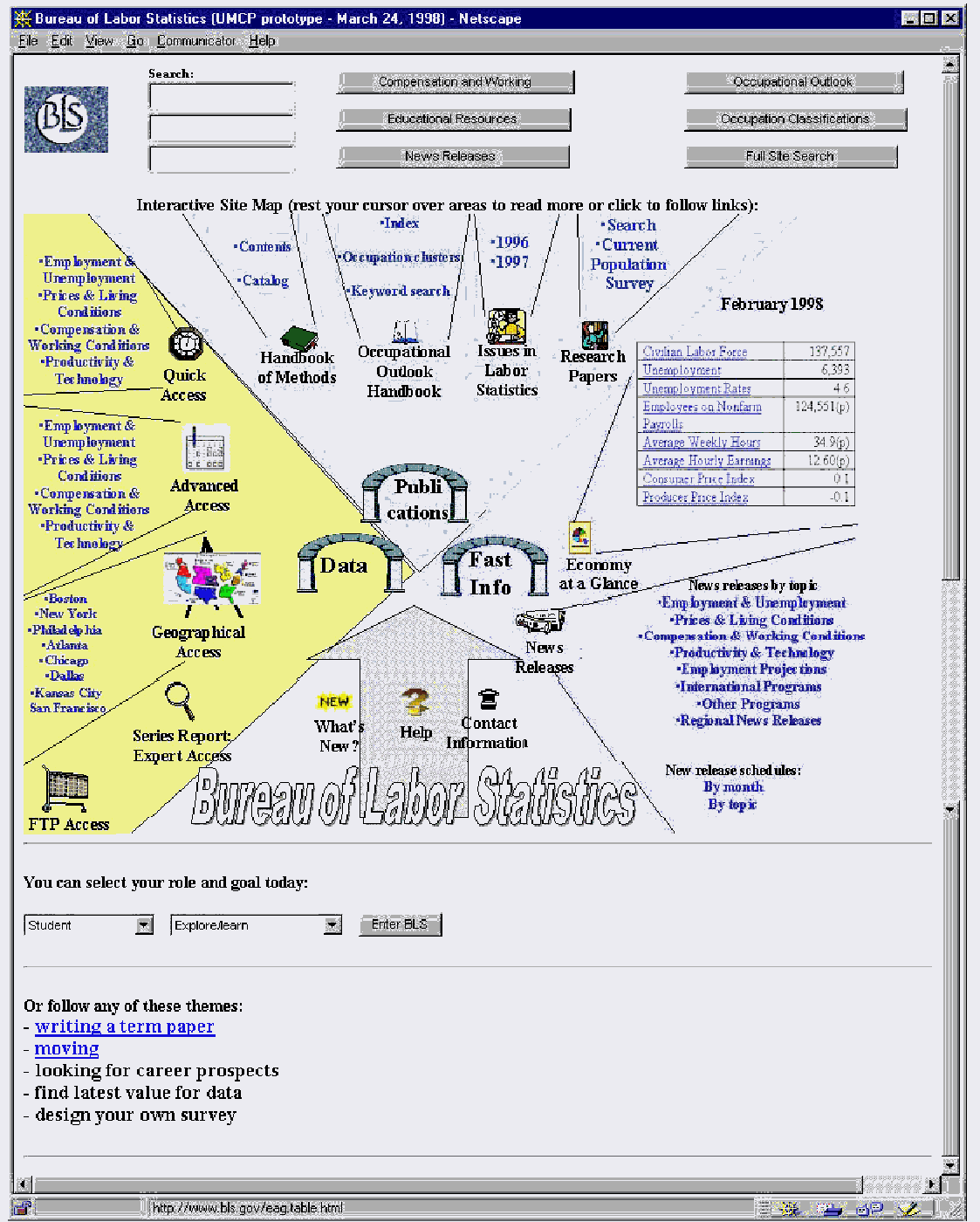
Prototype 3.
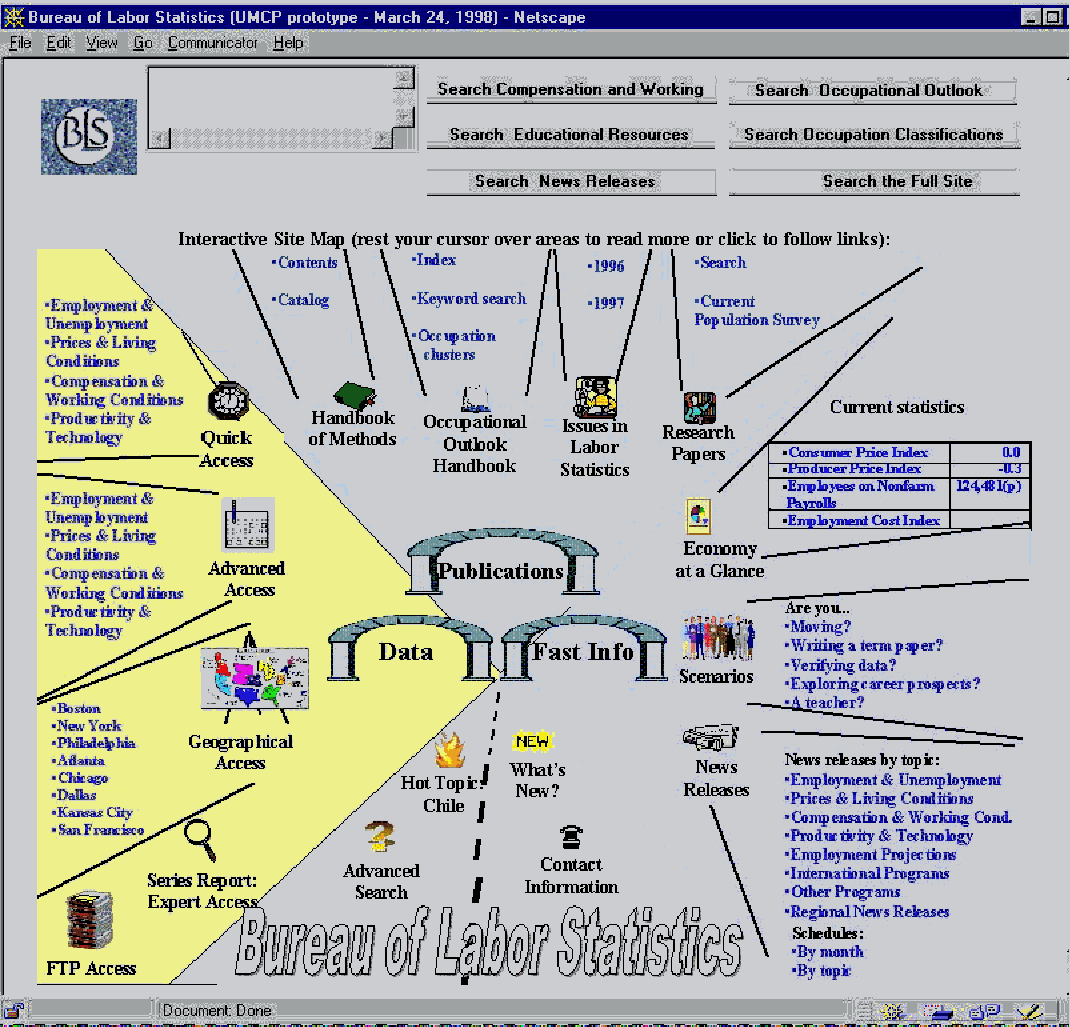
Scenario 1.
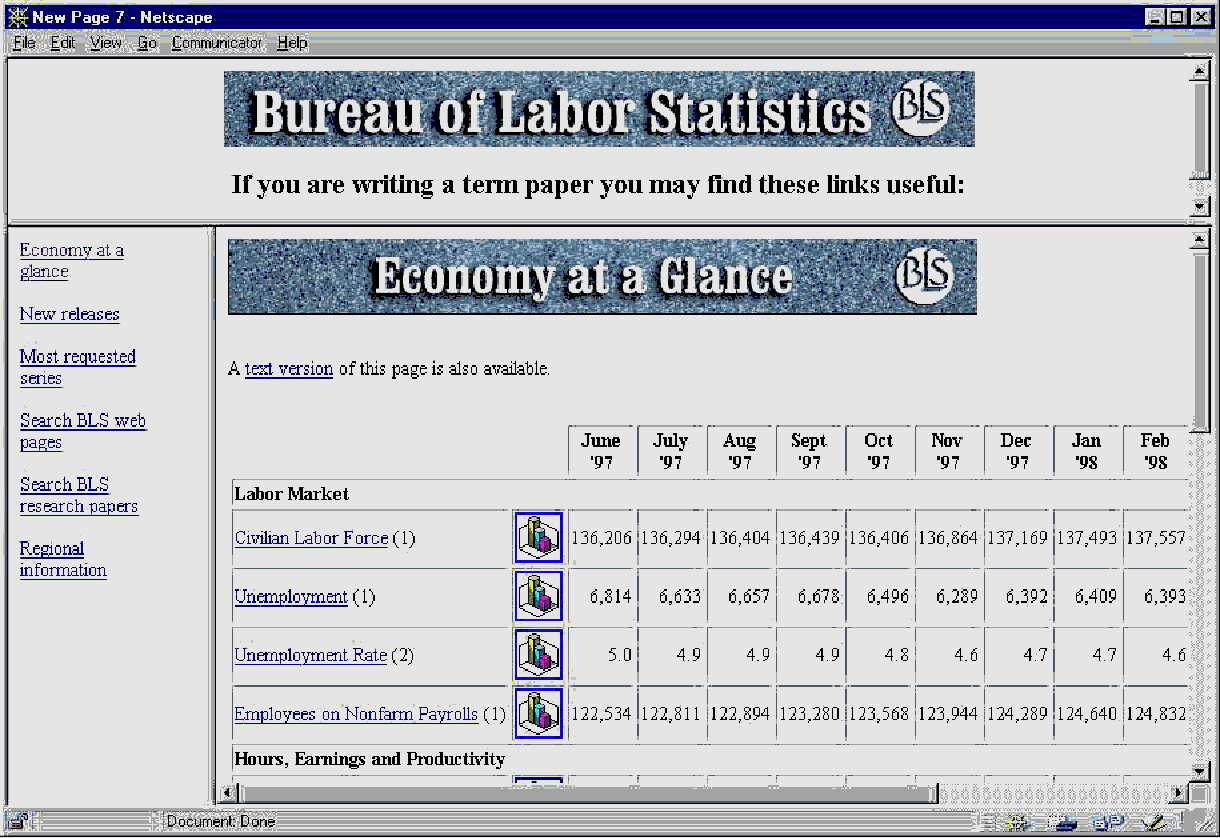
Scenario 2.
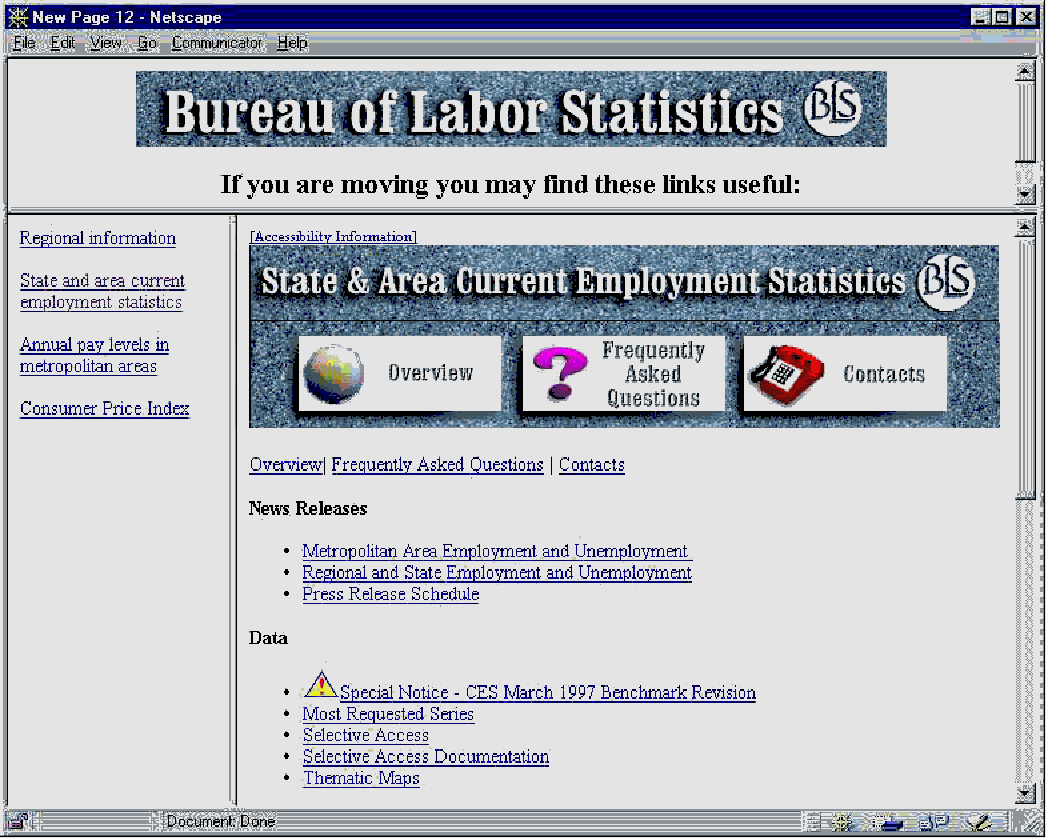
BLS Prototype Interface Usability Protocol
Session to be audiotaped.
Thank you for agreeing to review a prototype web site design that aims to be end-user oriented rather than BLS employee oriented. This session will take approximately 40 minutes.
Background
Do you work with statistical data on a regular basis? Briefly describe your work
How often do you use the BLS web site?
What are the main purposes for which you use the site?
Is the site bookmarked on your workstation?
II. Look at the screen. The search part of this interface is not implemented. The intention is to allow users to enter a query and then focus the query on a particular subset of the BLS site by pressing one of the buttons to the right, including the possibility for applying the search to the full site with the last button. Does this layout seem to you to accomplish this goal? Do you think this would be a useful way to implement search?
When you work through some scenarios in a few minutes, if you would opt for using search, simply tell me what you would type and which button you would press.
The rest of the screen is meant to be self-explanatory. Look it over and describe how you think it would be used.
I will ask you to find some information according to some typical scenarios. I am not interested in the actual answers but rather in how you would go about doing these tasks with this interface and whether it helps or hinders you. As you work, try to explain why you take your actions. [Note: subjects will be stopped two clicks after leaving the interface prototype; i.e., they will not actually find the answers in most cases]
Imagine you are an engineer living in San Francisco and want to move to Newark, NJ. Find out about wages for engineers in Newark.
Imagine you are a journalist writing a story on productivity in the US and Europe. Find out how the US compares to European countries in productivity.
Imagine you are an economics undergraduate and want to know how the producer price index is computed.
Imagine you are an employer who wants to know what the national average weekly hours worked was in February.
Imagine you are a journalist who wants to know how the national employment data is collected.
Imagine you are an accountant who must adjust a standing contract for inflation.
Imagine you are a Congressional aide and want to know if the Current Employment Statistics benchmark has been updated.
Imagine you want to know the consumer price index for Cleveland.
Invent your own scenario. Tell me what it is and how you would satisfy it with the prototype.
Now that you have had a chance to use the prototype, I have a few questions.
What do you think is the difference between data and fast information?
Does the overall organization seem clear?
Does the three-way division of content make sense? Are there alternatives you can suggest?
Is the screen too cluttered or confusing?
How would you compare this to the existing site?
Do you think this interface will be better ? Why?
Do you think this interface will be faster to use? Why?
Do you think this interface will be worse? Why?
Will the interface serve a variety of users? Why? How?
What is the best thing about this prototype?
What is the worst thing about this prototype?
Do you have any suggestions for improving it?
Thank you very much for you assistance!